
While making calls, WAVV will label each call with various call outcomes. But what do they all mean? This article will define each call outcome that you may see in your Call History tab.
Call History Tab
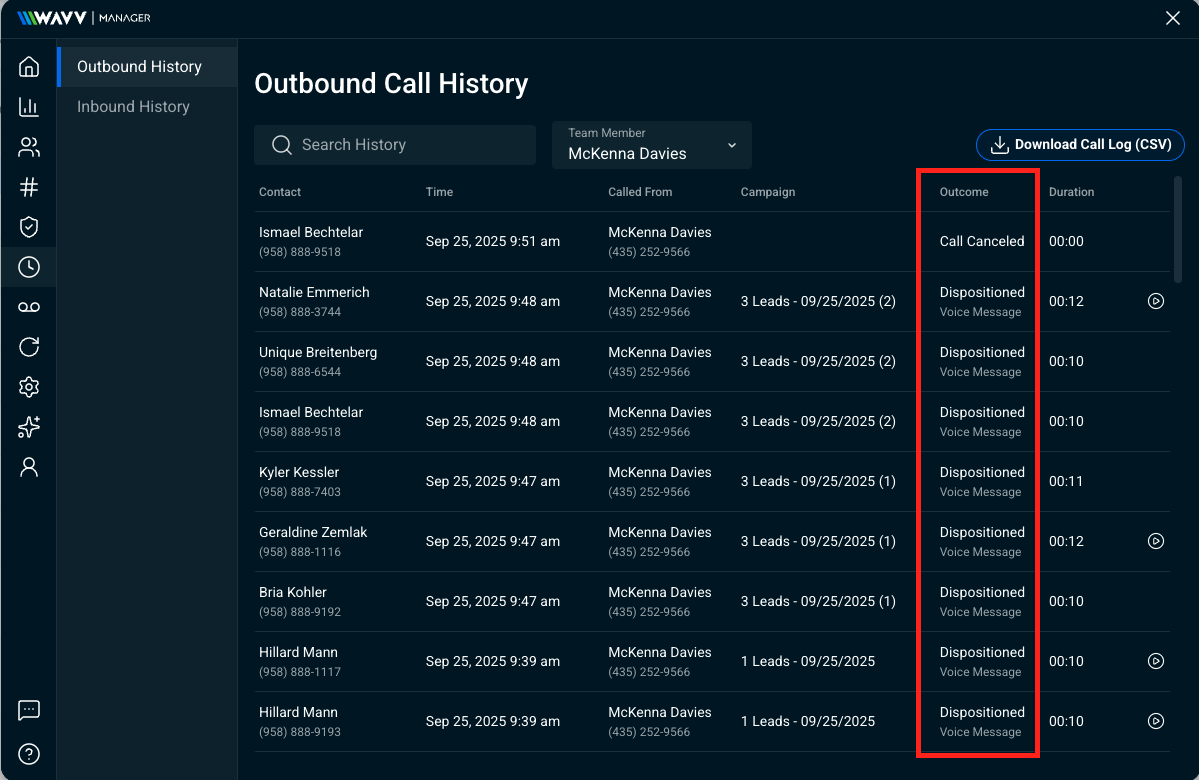
You can see call outcomes in your Call History tab in the column titled "Outcome."
Call Outcomes - Outbound
Dispositioned - this means the call connected with a live person (or went to an answering machine) and the disposition box popped up after your call. There will be a sub-title showing the specific disposition you selected or the automatic one that WAVV labeled the call as.
Call Canceled - this means you ended the call before anyone answered or before it went to someone's answering machine.
Callback - this means you are using the Multiline Dialer and 2 people answered at the same time. If someone heard your Callback message (saved in your WAVV Dialer Settings), the call outcome "Callback" will be shown. To learn more about Callbacks, click here!
No Callback - this means you are using the Multiline Dialer and 2 people answered at the same time. However, you don't have a Callback message saved in your WAVV Dialer settings, therefore, the customer answered, but the call was disconnected. Go set a Callback message so this doesn't happen!
Redialed - this means you have Double-Dial enabled in Beta Features and the lead didn't answer this first call. You'll notice a second call to the same lead shortly after in your Call History with a more definitive call outcome.
Call Outcomes - Inbound
Your inbound call history will have slightly different call outcomes.
Left Voicemail - this means you didn't answer the inbound call and the lead was sent to your answering machine. If they actually left a message, you can click the "play" button in Call History to listen to the recording, or go to your Voicemail tab and find it there. If they didn't leave you a message, there won't be a recording.
Dispositioned - this means you answered the inbound call and talked to the lead. After the call, the disposition box popped up and you selected a disposition. There will be a sub-title showing the specific disposition you selected or the automatic one that WAVV labeled the call as.
Answered - this means you answered the call, but dispositions are not enabled in your settings.