
Using WAVV Premium Workflow Triggers
WAVV now offers three premium workflow triggers that give you more control over how and when your automations fire:
Call Started
Call Ended
Call Recorded
These triggers make it easier to streamline processes, improve team efficiency, and capture every opportunity.
Important: Premium triggers are billed by your CRM at $0.01 per execution. Be sure to consider this when designing high-volume workflows.
Before You Begin
To access these triggers, you’ll need to:
Update your WAVV Dialer marketplace app to the latest version.
Ensure you have access to Workflows in your CRM’s Automation section.
Be aware that each time a premium trigger runs, your CRM will charge $0.01 per execution.
How to Use WAVV Premium Triggers
Step 1: Open the Workflows area
In your CRM, go to Automation → Workflows.
Click + Create Workflow. You can start from scratch or select a recipe.
Step 2: Add a Trigger
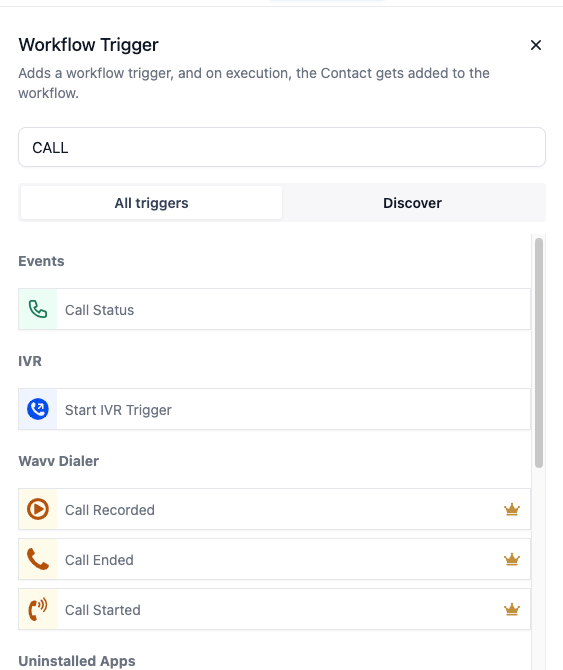
In the workflow builder, click + Add Trigger.
Scroll and look for the WAVV Dialer section, or just search for “Wavv” or “Call”.
Select one of the new triggers: Call Started, Call Ended, or Call Recorded.
Step 3: Configure Actions
Once your trigger is added, you can connect it to any workflow actions available in your CRM, like sending emails, updating fields, creating tasks, or sending alerts.
Use Cases for Each Trigger
Call Started
This trigger fires the instant a call connects.
Log activity instantly: Automatically track the start of calls in your CRM.
Start timers or SLAs: Kick off countdowns for service-level response tracking.
Notify managers in real time: Send alerts when a high-value customer is on the line.
Call Ended
This trigger fires the moment a call finishes.
Prompt quick follow-ups: Automatically create a task or send an email after calls.
Survey your customers: Launch an NPS or call quality survey after the conversation.
Generate summaries: Send call notes to Slack for faster reviews.
Call Recorded
This trigger fires once a call recording is processed and ready.
Streamline QA reviews: Route recordings directly to your quality assurance team.
Coaching workflows: Assign recordings to managers for training sessions.
Archive automatically: Save call recordings to Google Drive, Dropbox, or other tools.
Pro Tips
Combine triggers with conditional logic to create smart branching workflows.
Use tags and custom fields in your actions to track which calls triggered which automations.
Keep high-volume automations efficient to avoid unnecessary per-execution costs. Remember, WAVV is designed to help you place a lot of calls in a short amount of time, and a poorly configured trigger could result in a large CRM bill.
With WAVV’s premium triggers, your workflows move at the speed of your conversations, keeping your team responsive, consistent, and efficient.