
You can cancel your WAVV subscription at any time, either yourself from the Billing tab or by reaching out to our support team. You'll keep full access through the end of your current billing cycle and won't be charged again.
Before you start-
Only the account owner can cancel. Other team members won't see the option to manage the subscription.
-
Cancelling your CRM doesn't cancel WAVV. Cancel WAVV first, then your CRM. If you've already cancelled your CRM, contact support and we'll cancel WAVV for you.
-
Cancelling isn't a refund request. If you want a refund, ask for it separately within 7 days of your most recent charge.
-
Want to keep your call history? Download it before you cancel, or within 90 days after.
- Access · What happens when you cancel: Full access through the end of your current billing cycle
- Billing · What happens when you cancel: You won't be charged again
- Phone numbers · What happens when you cancel: Removed once your subscription is cancelled
- Call history, recordings and transcriptions · What happens when you cancel: Kept for 90 days, then deleted automatically
- Wallet balance · What happens when you cancel: Not refundable. It's kept for 12 months in case you come back.
How to cancel from the Billing tab
1. In WAVV, open the Billing tab.
2. Click Manage Subscriptions under your subscription plan in the middle of the screen. You'll be taken to Stripe, our billing service.
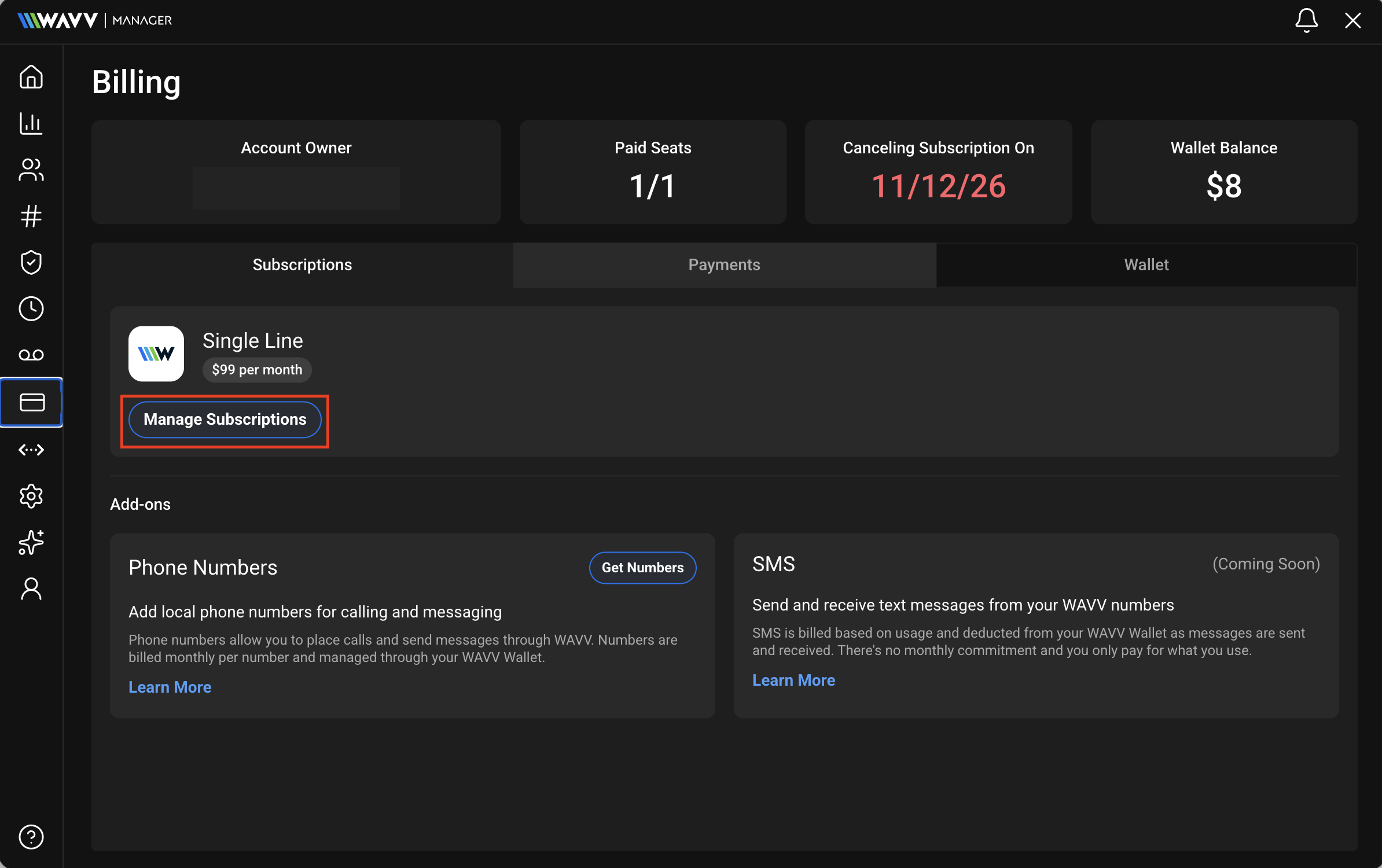
3. Click Cancel subscription and confirm.
Good to know: If you're on a free trial, cancel the same way before your trial ends and you won't be charged.
How to cancel through WAVV Support
Use this option if you can't get into WAVV (for example, you've already cancelled your CRM) or you'd rather we handle it.
1. Reach out to WAVV Support through chat at help.wavv.com. Include the email on your account.
2. We'll cancel your subscription and confirm it with you.
How to request a refund
Subscription charges aren't refundable once they've gone through. There's one exception: if you ask for a refund within 7 days of your most recent charge, and you haven't placed any calls or sent any texts in those 7 days, we'll refund that charge.
-
It applies only to your most recent charge.
-
It can be used once per account.
-
On annual plans, the 7-day window is at the start of each annual billing cycle, not each month.
1. Contact WAVV Support within 7 days of your most recent charge.
2. Ask for a refund of that charge.
Good to know: Cancelling doesn't count as a refund request. Even if you've already cancelled, you still need to ask for the refund within the 7 days.
Full details: Terms of Service, section 10.2
Still stuck?
Reach out to WAVV Support through chat at help.wavv.com.
Related links: Billing Tab (Teams) · Billing Tab (Individual Users) · WAVV Wallet FAQs
Frequently asked questions How do I cancel my WAVV subscription?
If you're the account owner, go to the Billing tab, click Manage Subscriptions, then click Cancel subscription in Stripe. You can also reach out to our support team and we'll cancel it for you. Either way, you'll keep full access through the end of your current billing cycle and won't be charged again.
I don't see Manage Subscriptions. How do I cancel?
Only the account owner can manage the subscription. Ask your account owner to cancel, or contact support for help.
Can I get a refund?
Only in one case: you ask within 7 days of your most recent charge, and you haven't placed any calls or sent any texts in that time. It can be used once per account. On annual plans, the window is the first 7 days of each annual billing cycle.
Is my Wallet balance refundable?
No. Wallet balances aren't refundable, but you can use your balance until it reaches $0. If you cancel, your balance is kept for 12 months in case you resubscribe.
What happens to my numbers and call history when I cancel?
Your phone numbers are removed once your subscription is cancelled. Call history, recordings and transcriptions are kept for 90 days, then deleted automatically. If you resubscribe within those 90 days, you can access your previous information again. Download anything you want to keep before the 90 days are up.
Can I pause my account instead of cancelling?
No. WAVV doesn't offer a pause option at this time. You can cancel and resubscribe later. If you come back within 90 days, your call history will still be there, but your phone numbers won't.