
Team Monitoring lets Owners, Managers, Admins and Coaches join a team member's live call. You can listen silently, whisper coaching that only your team member hears, or barge in so both your team member and the contact can hear you.
Before you start
- You need the Owner, Manager, Admin or Coach team role.
- The team member you want to monitor needs a dialer seat.
- The team member must be on an active call. If they aren't, WAVV won't start monitoring and shows a message explaining why.
| Mode | Team member hears you | Contact hears you |
|---|---|---|
| Listening | No | No |
| Whispering | Yes | No |
| Barging | Yes | Yes |
Start monitoring a call
1. Go to the Team Management page. The Status column shows whether each team member is offline, online, dialing or in a call.
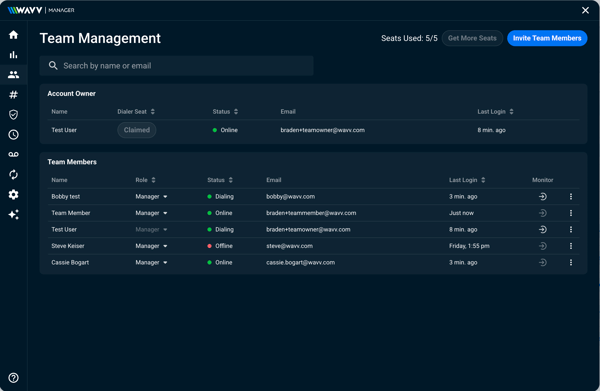
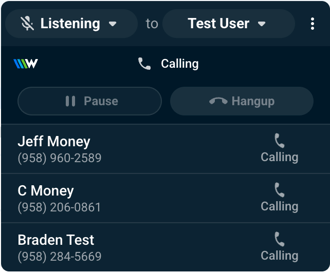
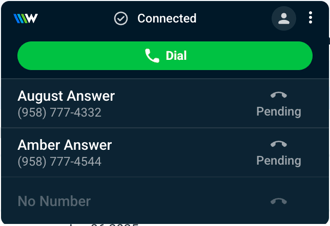
2. Click the Monitor icon next to the team member. A monitoring mini-dialer opens with your monitoring status and a drop-down of team members you can monitor.
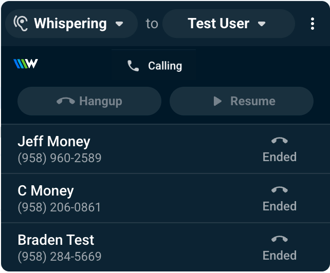
3. To coach your team member without the contact hearing you, change your status to Whispering.
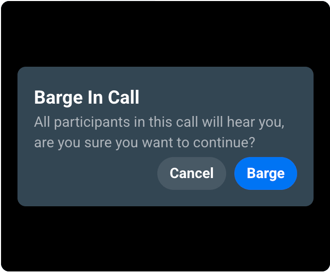
4. To join the conversation, select Barging and confirm. Both parties can hear you, but only your team member can hang up or transfer the call.
Good to know: Monitoring follows your team member from call to call. When they end one call and start another, you stay connected until you leave or they close their dialer.
Stop monitoring
1. Click the ⋮ menu on the monitoring mini-dialer.
2. Select Close dialer.
What your team member sees
When someone is monitoring a call, your team member sees a monitoring icon on their mini-dialer. Hovering over the icon shows the name of the person monitoring.
Still stuck?
Reach out to WAVV Support through the chat icon in the bottom-right corner of the Help Center.
Related links: Understand WAVV Team Roles · 3. How to Add/Remove Team Members
Next step: 12. Billing Tab (Teams)
Frequently asked questions
Why can't I monitor a team member?
The team member has to be on an active call. If they're offline, online but not on a call, or not assigned a dialer seat, WAVV won't start monitoring.
Who can monitor calls?
Anyone with the Owner, Manager, Admin or Coach role. Any team member with a dialer seat can be monitored.
Can I hang up or transfer a call while barging?
No. Hanging up and transferring stay with the team member you're monitoring.
Will my team member know I'm listening?
Yes. A monitoring icon shows on their mini-dialer, and hovering over it shows who is monitoring.