
New to text messaging for your business? This guide walks you through everything you need to register successfully the first time. No prior experience required—we'll explain the jargon as we go.
What Is A2P 10DLC and Why Do I Have to Register?
A2P stands for "Application-to-Person"—any text sent from a business or software to a person (appointment reminders, order updates, login codes, promotions). 10DLC means "10-Digit Long Code," which is just the standard 10-digit phone number you're already familiar with.
In the United States, mobile carriers require every business that sends texts over a standard phone number to register first. Registration tells the carriers who you are and what kind of messages you'll send. Unregistered traffic gets filtered or blocked, so your messages may never arrive until you complete this process. Registration has two layers:
Brand — who you are (your legal business identity).
Campaign — what you'll send (the specific kind of messages and how people signed up to receive them).
This registry is currently administered by The Campaign Registry https://www.campaignregistry.com/about/ who maintains a database of the above information. Carriers rely on this information to validate your messages
You will register your Brand once, and then create a Campaign under it. This guide focuses mostly on the Campaign, because that's where the detail lives—and where most rejections happen.
Heads up on timing: Reviews are handled by carriers and the central registry, not by WAVV, and review times vary with submission volume. Plan for several business days, and getting it right the first time is the fastest path to approval.
Before You Start: A Quick Checklist
Have these ready and you'll move through registration much faster:
[ ] Your exact legal business name, EIN (tax ID), and registered business address—matching your IRS paperwork. CBN is supported for Canadian businesses
[ ] A live website that represents your business
[ ] Knowledge of what type of messages you're sending (reminders? marketing? login codes?)
[ ] 2–5 sample messages that look like what you'll actually send
[ ] A clear description of how people sign up to receive your texts
[ ] A Privacy Policy URL and a Terms & Conditions URL (both publicly accessible, both https://)
Part 1: Describe Your Campaign
Write a Clear Messaging Use Case
Your description should answer three simple questions:
Who is sending the message?
Who is receiving it?
Why are they receiving it?
Keep it consistent with your registered brand and your sample messages.
Don't include personal information (real customer names or phone numbers) in this field. Brand names and your own business phone numbers are fine.
- "Messages are sent by {Brand} to existing customers who have opted in. Messages include OTP codes for login and security alerts about profile changes." · This doesn't: "We send texts to people." (Too vague—no brand, recipient, or purpose)
- "Messages are sent by {Brand} to patients with upcoming appointments, including reminders, rescheduling options, and post-visit instructions." · This doesn't: "John Smith at 555-123-4567 receives reminders from our office." (Contains personal info)
- This doesn't: "Messages are sent by {Software Vendor} to dental patients." (Registered the software vendor instead of the actual dental practice)
Part 2: Write Good Sample Messages
Provide 2–5 examples of what your texts will actually look like. This shows reviewers exactly what customers will receive.
Tips:
Use brackets for variables: [Name], [1234], [Date].
Include your brand name so it's clear who's texting.
Add "Reply STOP to unsubscribe" to at least one sample.
Make samples match your stated use case and description.
When you submit, you'll also flag whether messages contain: embedded links or phone numbers Check these accurately—they affect review.
- "Dental checkup due for [Name]. Visit [website] to schedule or call [phone]. Reply STOP to opt out." · This doesn't: "Here is your code." (No brand, no context)
- "This is [agent name] from [company name]. I see that you weren't able to make it for our appointment. Click here to reschedule: [website link]. Reply STOP to unsubscribe." · This doesn't: "Hi, is this the owner of 123 Oak St? I want to buy your house." (Cold outreach isn't allowed)
Part 3: Explain How People Opt In (Consent Method)
This is the single most important section—and where most rejections happen. "Consent method" just means: how does someone agree to receive your texts? Reviewers need to see that people knowingly and willingly signed up. Uploading a screenshot here is optional, but very helpful.
What Your Opt-In Must Show
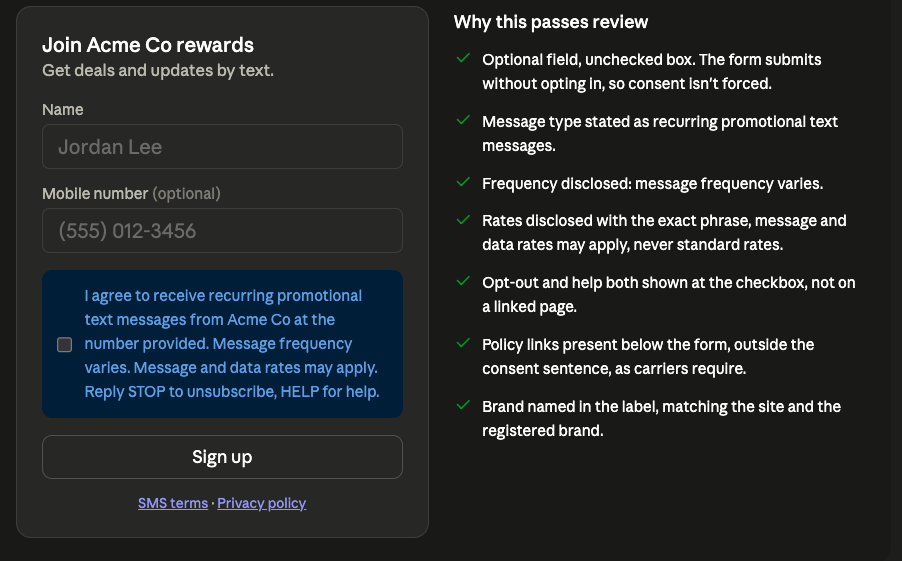
At the moment you collect someone's phone number, the sign-up point (a call-to-action) needs to display all of the following:
Service name and description — e.g., "Sign up to receive shipping notifications from Acme!"
Fee disclosure — the exact phrase "Message and data rates may apply"
Message frequency — e.g., "One message per login" or "Message frequency varies"
Customer care contact — e.g., "Reply HELP for help"
Opt-out instructions — e.g., "Reply STOP to opt out"
Exact-wording gotcha: Use "Message and data rates may apply." Do not write "standard message and data rates," because the word "standard" implies the existence of premium-rate messaging, which isn't allowed in the US.
Consent Must Be Voluntary
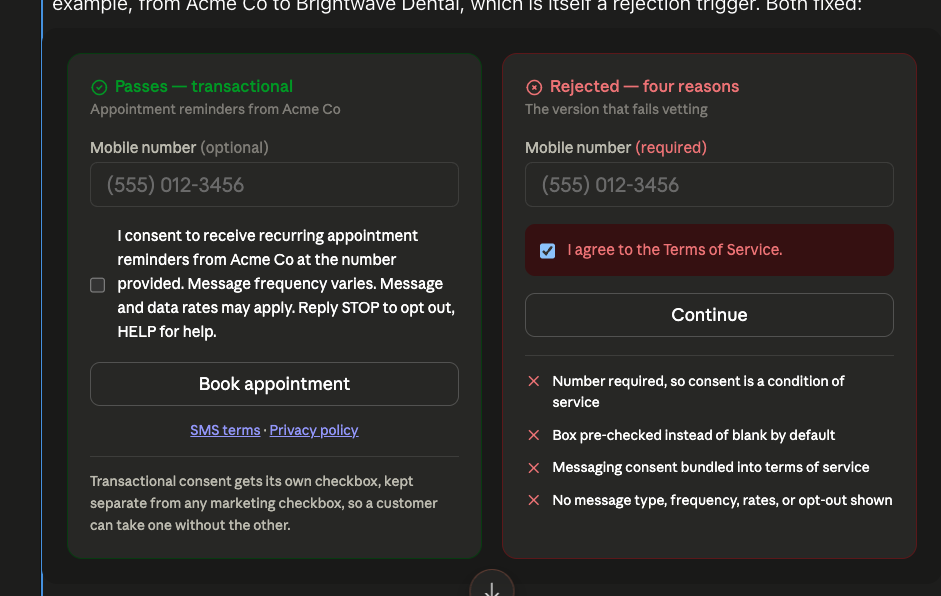
This is a hard rule. Customers cannot be forced to agree to texts in order to do something else.
- ☐ "Yes, I'd like to receive text alerts about my order" (unchecked by default, optional) · This doesn't: ☑ "I agree to receive text messages" (pre-checked box)
- A separate SMS checkbox, distinct from your Terms of Service · This doesn't: "By agreeing to our Terms, you consent to promotional messages" (consent bundled into ToS)
- "Add my mobile number for delivery updates (optional)" · This doesn't: "Phone number required to complete purchase" with mandatory opt-in
In short: opt-in controls must be blank/off by default, and messaging consent must be separate from your terms of service or privacy policy.
The Consent Language Must Sit Right at the Checkbox
This is the subtle trap that fails campaigns even when everything else looks right. The four required disclosures—message type, frequency, "Message and data rates may apply," and opt-out instructions—must appear at or immediately next to the consent control, visible before the user clicks. Burying them in a linked Terms of Service page doesn't count.
A generic "I agree to the Terms of Service" checkbox is not valid messaging consent, even if your Terms page contains all the right language. Reviewers need to see the consent agreement itself at the point of action.
- "I agree to receive recurring promotional text messages from [Brand]. Message frequency varies. Message and data rates may apply. Reply STOP to unsubscribe. Terms: [url]. Privacy: [url]." · Rejected checkbox label: "I agree to the Terms of Service."
- "By checking this box you agree to receive recurring text messages from [Brand]. Message frequency varies. Message and data rates may apply. Reply STOP to cancel." · Rejected checkbox label: "By checking this box you agree to receive texts from [Brand]. Reply STOP to cancel." (missing frequency and rates)
The second "rejected" example is the one that catches most people—it looks complete but is missing the frequency and rates disclosures. All four elements have to be present.
Your Opt-In Must Be Publicly Visible
Reviewers need to verify your opt-in. If sign-up happens somewhere they can't simply visit—
behind a login or gated page,
on a paper form,
through a verbal/phone script,
inside an app, or
on a page that isn't published yet—
then take a screenshot and upload it through WAVV. Otherwise, including the URL in the consent message body is sufficient.
Writing the Description Itself
The consent method you submit is a single text field (limit 2046 characters) that has to tell reviewers the whole opt-in story. A one-liner like "Users opt in on our website" gets rejected—it names no URL, describes no consent action, and links to no policies.
A strong consent method names where consent happens, describes the action the user takes, states frequency and rates, and links both legal pages. Here are patterns by opt-in type:
Website form:
"End users opt in by visiting [url]/sms-signup and entering their phone number, then checking a box agreeing to receive recurring [message type] messages from [Brand]. Message frequency varies. Message and data rates may apply. Terms: [url]/terms. Privacy: [url]/privacy (states mobile numbers are not shared with third parties)."
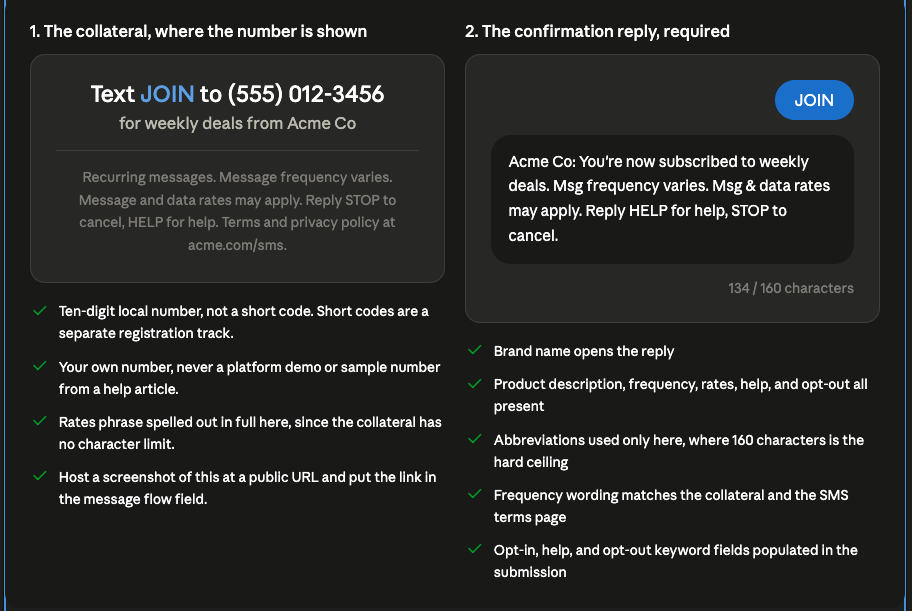
Keyword / text-to-join:
"End users opt in by texting JOIN to [number]. They receive an auto-reply: '[Brand]: You're now subscribed. Msg frequency varies. Msg & data rates may apply. Reply HELP for help, STOP to cancel.' Terms: [url]/terms. Privacy: [url]/privacy."
Paper / in-store form:
"End users opt in by completing a paper form at [Brand] locations. The form collects their mobile number and has a checkbox to consent to recurring [message type] messages. The form states frequency varies and message and data rates may apply, and links to [url]/terms and [url]/privacy. A photo of the form is hosted at [public url]."
Example Screenshots
Part 4: Provide a Privacy Policy and Terms & Conditions
Both are required, and both need a publicly accessible https:// link.
Privacy Policy
This is one of the most common reasons registrations fail, so it's worth getting exactly right. A privacy policy that "exists" isn't enough; it has to contain specific language, and it has to be reachable.
Your privacy policy must:
Be publicly accessible—not behind a login, not a draft, not a 404. Reviewers will actually visit the URL. If it doesn't load for them, the campaign is rejected.
Disclose what data you collect and how you use it for your messaging program (e.g., "We collect your name and mobile number when you sign up for SMS updates, and use them only to send the messages you requested").
Explicitly state that mobile opt-in and consent data are NOT shared or sold to third parties or affiliates for marketing or promotional purposes. This single sentence is the most-missed requirement in the entire process—its absence triggers a privacy-policy rejection on its own.
Be the only privacy policy reviewers find. If your site links to several different or conflicting policies, reviewers can't confirm which one applies, and that ambiguity alone can cause rejection.
If your opt-in happens on a website, the privacy policy (or the linked terms) should also carry the message frequency and "Message and data rates may apply" disclosures.
Here's ready-to-use language you can adapt (have your own counsel confirm it fits your situation):
"The mobile information and SMS opt-in consent we collect will not be shared, sold, or otherwise disclosed to third parties or affiliates for their marketing or promotional purposes. This category excludes text-messaging originator opt-in data and consent; this information will not be shared with any third parties."
Why this exact clause matters: Carriers added the no-sharing requirement specifically to stop phone numbers being harvested under one pretext and resold. Reviewers are trained to look for this clause specifically—vague paraphrases like "we value your privacy" don't satisfy the check.
Terms & Conditions
These should generally include:
Program or brand name
Program description
"Message and data rates may apply" disclosure
Message frequency (or a recurring-message disclosure)
Customer support contact
Complete HELP and STOP instructions, shown in bold
A link to your privacy policy
A carrier-liability line: "Carriers are not liable for any delayed or undelivered messages"
Pro tip: Create messaging-specific privacy and terms pages rather than editing your main company documents. They're easier to keep current if requirements change. Consider having legal counsel review them.
Part 5: Final Pre-Submission Check
Most rejections come down to inconsistency or missing fields. Run through this before you submit:
[ ] Brand name matches across your registration, website, and message content
[ ] Email domain matches your business (use you@yourcompany.com, not gmail/yahoo, for corporate brands)
[ ] Website is live, loads without errors, and represents the registered brand
[ ] Links inside your messages point to your brand—no third-party redirects
[ ] No personal info (real names/numbers) in descriptions or samples—use placeholders
[ ] Privacy Policy URL and Terms & Conditions URL are filled in, public, and https://
[ ] Opt-in is voluntary and not bundled into other agreements
[ ] One EIN, no duplicate brands or campaigns (duplicates slow approval)
[ ] Sample messages include your brand and at least one STOP instruction
A Few Gotchas That Aren't Obvious
No public link shorteners. URLs in your samples or site can't use bit.ly, TinyURL, or similar. Use a branded/dedicated short domain or the full URL—public shorteners get campaigns rejected and hurt deliverability.
Use case must match content. Sending promotional messages from a campaign registered as transactional creates a mismatch reviewers (and carriers) flag. Register the use case you'll actually send.
Spam-trigger language depresses trust scores. Words like "FREE!!!", "WINNER", "GUARANTEED", "ACT NOW" don't guarantee a block but lower deliverability.
Newer regulatory layers. Beyond carrier/CTIA review, US senders should be aware of the FCC's expanded opt-out rules (consumers may revoke consent through any reasonable channel, processed promptly) and the one-to-one consent direction in recent FCC rulemaking. These are legal obligations that sit alongside registration. This isn't legal advice—loop in counsel for how they apply to you.
Commonly Known Rejection Reasons
Beyond the requirements above, these are patterns that show up again and again in rejected registrations:
Brand name doesn't match your EIN. If the legal name tied to your EIN doesn't exactly match the name on your campaign or opt-in form, include a brief description explaining why (a DBA, a recent name change, etc.). You can also upload supporting documents, like a name-change form, and reference them in your description.
Opt-in screenshot is incomplete. If your opt-in is a web form, capture the full browser window rather than just the form itself, so it's clear the URL you submitted matches what's shown in the screenshot.
Incomplete legal language. Make sure your forms and privacy policy include "Message and data rates may apply," state your message frequency (e.g., "message frequency varies"), and include "Reply STOP to opt-out."
Terms & Conditions missing an SMS section. Your Terms & Conditions need the same messaging disclosures as your privacy policy—don't assume your general terms already cover it.
Sample messages don't match your stated use case. If you list multiple message types—appointment reminders, customer care, etc.—include at least one sample message for each type.
Multiple opt-in methods without evidence for each. If you note more than one way people opt in (for example, both verbal and online), provide evidence for each method—multiple screenshots can help here.
Brand doesn't match your EIN because it's too new. If you just applied for your EIN, it can take time to reach A2P providers. Plan to wait one to two weeks after applying before you register, and use your CP 575 (the IRS confirmation notice) as your reference when filling out the registration.
Marketing campaigns are harder to get approved. If you send marketing messages, keep them as separate as possible from your non-marketing campaigns—separate opt-in forms, separate Terms & Conditions, and so on. WAVV recommends avoiding marketing campaigns where you can.
A Complete Example, Start to Finish
To pull it all together, here's how a fictional business—Brightwave Dental, a single dental practice—would register for appointment reminders.
The situation: Brightwave wants to text patients their appointment reminders and let them reply to reschedule. They use scheduling software from a vendor called "SmileSoft," but the messages are from Brightwave to Brightwave's patients.
Step 1 — Register the right brand. Brightwave registers Brightwave Dental using its own legal name, EIN, and address—not SmileSoft. (Registering the software vendor is a classic rejection.) Their email is office@brightwavedental.com, matching their website brightwavedental.com.
Step 2 — Write the description (who / why):
"Messages are sent by Brightwave Dental to patients with upcoming appointments who provided their number when scheduling. Messages include appointment reminders, rescheduling options, and post-visit care instructions."
It names the sender, the recipients, and the reason—and it matches their sample messages.
Step 3 — Write sample messages:
"Brightwave Dental: Hi [Name], you have a cleaning on [Date] at [Time]. Reply C to confirm or R to reschedule. Reply STOP to opt out."
"Brightwave Dental: Thanks for visiting! Your next checkup is due in 6 months. Call [phone] to book. Reply HELP for help, STOP to cancel."
Both name the brand, use bracketed variables, match the registered use case, and include opt-out language.
Step 4 — Document the opt-in. Brightwave doesn't just say "patients opt in online." They write the full story into the message flow field:
"End users opt in by booking an appointment at brightwavedental.com/book and checking an optional box agreeing to receive recurring appointment reminders and post-visit care messages from Brightwave Dental. Message frequency varies. Message and data rates may apply. Reply HELP for help, STOP to opt out. Terms: brightwavedental.com/sms-terms. Privacy: brightwavedental.com/privacy (states mobile numbers are not shared with third parties)."
This names where consent happens, the action, the disclosures, and both legal links—everything reviewers verify.
Here's exactly how this clears each check that commonly fails:
Consent isn't required — you can finish booking without checking the box (avoids the "consent required for service" rejection).
Unchecked by default — the patient actively opts in (avoids the pre-checked-box rejection).
Separate from Terms of Service — it's its own checkbox, not bundled into "I accept the Terms" (avoids the bundled-consent rejection).
All four disclosures at the control — message type ("recurring … reminders"), frequency ("varies"), rates ("Message and data rates may apply"), and opt-out ("Reply STOP") are all visible before clicking (avoids the missing-consent-language rejection).
Correct rate wording — "Message and data rates may apply," not "standard rates."
Publicly verifiable — the booking form is a public URL reviewers can open. (If it were behind a patient login, Brightwave would screenshot the form, host it on Google Drive, and paste that link into the message flow field.)
Step 5 — Provide policies. Brightwave publishes a dedicated messaging Privacy Policy at a public URL that includes the make-or-break sentence: "The mobile information and SMS opt-in consent we collect will not be shared, sold, or disclosed to third parties or affiliates for marketing or promotional purposes."
Their Terms & Conditions page (also public) carries the program description, rates disclosure, frequency, support contact, bold HELP/STOP instructions, a link to the privacy policy, and the carrier-liability line.
Step 6 — Final check and submit. Brand name, website, and email all say "Brightwave Dental." No patient names in any field. Both URLs are live, public, and https://. The use case matches the samples. Everything lines up, so the campaign clears review.
What Happens After You Submit
Your campaign goes to the carriers and the central registry for review. If approved, you can begin messaging. If rejected, you'll get an email from WAVV with a reason—fix the specific issue above and resubmit.
Still stuck? Reach out to our support team and we'll help you get unblocked.
A2P 10DLC Registration Checklist
A quick pre-submission checklist. If every box is checked, you're in good shape to register.
Brand Identity
[ ] Legal business name, EIN, and address match your IRS records exactly
[ ] Website is live, loads without errors, and represents this business
[ ] Email uses your business domain (not gmail/yahoo) for corporate brands
[ ] Brand name, website, and email all clearly tie to the same business
[ ] You registered the actual sender—not your software vendor or platform
[ ] No duplicate brands or campaigns under the same EIN
Campaign Description
[ ] Answers who is sending, who is receiving, and why
[ ] Matches your use case and your sample messages
[ ] Uses the correct use case (Mixed only if you truly send multiple types)
[ ] Contains no personal info (use placeholders like [Name], [555-555-5555])
[ ] Includes "Direct Lending" if you're a first-party lender (even for 2FA-only)
Opt-In / Message Flow
[ ] Sign-up clearly describes the service and names your brand
[ ] Shows the fee disclosure exactly: "Message and data rates may apply" (no "standard")
[ ] States message frequency
[ ] Shows customer care contact ("Reply HELP for help")
[ ] Shows opt-out instructions ("Reply STOP to opt out")
[ ] Opt-in is voluntary—not required to buy, register, or use the service
[ ] Consent is separate from Terms of Service and Privacy Policy
[ ] Checkboxes/toggles are blank or off by default
[ ] All four disclosures (message type, frequency, "Message and data rates may apply," opt-out) appear AT the checkbox—not only on a linked page
[ ] Message flow field describes where consent happens, the action, disclosures, and links to both legal pages
[ ] Separate opt-in for each campaign type (transactional vs. marketing)
[ ] Marketing opt-ins are documented (checkbox/form/keyword), not just verbal
[ ] If opt-in isn't publicly visible (login, paper, verbal, in-app, unpublished), a public screenshot link is provided in the message flow
Policies (both required, public, https://)
[ ] Privacy Policy URL provided
[ ] Privacy Policy is publicly reachable (no login wall, no 404, only one clear policy)
[ ] Privacy Policy contains the no-sharing clause: mobile opt-in/consent data is NOT shared or sold to third parties or affiliates for marketing
[ ] Terms & Conditions URL provided
[ ] T&C includes program name, description, rates disclosure, frequency, support contact, bold HELP/STOP instructions, privacy-policy link, and carrier-liability line
Sample Messages
[ ] 2–5 samples that match your use case and description
[ ] Each includes your brand name
[ ] Variables shown in brackets ([Name], [1234], [Date])
[ ] At least one includes "Reply STOP to unsubscribe"
[ ] Content flags set accurately (embedded links, phone numbers, direct lending, age-gated)
[ ] No public link shorteners (bit.ly, TinyURL)—use a branded short domain or full URL
[ ] Sample content matches the registered use case (no marketing from a transactional campaign)
Keywords & Auto-Replies
[ ] STOP / opt-out reply configured (brand name + confirmation no more messages)
[ ] HELP reply configured (brand name + way to get support)
[ ] Opt-in confirmation set for recurring campaigns (brand, rates disclosure, help, opt-out, frequency)
A2P Registration FAQ
Can I use the A2P registration I completed with GoHighLevel (GHL)?
No. A2P stands for Application-to-Person messaging, and registrations are tied to the specific application sending text messages.
Since GoHighLevel and WAVV are separate applications, each platform requires its own A2P registration.
Can I use texting for cold outreach?
No. Sending unsolicited text messages for cold outreach is not permitted. SMS campaigns require recipient consent and proper opt-in before messages can be sent.
Can I use texting for affiliate marketing or lead generation/sharing?
No. Affiliate marketing and lead generation sharing are strictly prohibited under US mobile carrier A2P 10DLC (Application-to-Person 10-Digit Long Code) rules. Submitting a campaign that involves affiliate promotions, third-party lead sharing, or buying/selling leads will trigger an automatic rejection or brand suspension.
I don't have a Privacy Policy. What should I do?
Our A2P Best Practices Guide includes sample Privacy Policy templates you can use as a starting point.
Please note that WAVV does not provide legal advice or guarantee that these templates meet your business's legal requirements. We recommend consulting with legal counsel to create a Privacy Policy that is appropriate for your business.
How long does A2P registration take to be approved?
Most A2P registrations are approved within 5-10 business days.
I just created my EIN. When should I submit my A2P registration?
If you recently created your EIN, we recommend waiting a few days before submitting your A2P registration.
It can take time for your EIN to appear in our provider's verification database. Submitting your registration too soon may result in delays or rejection.
I'm a sole proprietor. How many phone numbers can I register?
If you do not have an EIN:
You can register one phone number.
If you have an EIN:
You can use multiple phone numbers.
During the A2P registration process, you will still be asked to provide one representative phone number on the registration form.
Most rejections come down to two things: inconsistency between fields, or a missing required URL. When in doubt, make every detail point to the same business and double-check that both policy links are filled in and public.
These examples are provided by WAVV solely as a convenience and starting template. They are not intended to provide legal guidance and are not a substitute for your own legal counsel. WAVV is not a law firm and provides no legal services. We are not liable for any content, code, or other errors or omissions or inaccuracies. No attorney-client relationship is created by your use of these templates. You are solely responsible for ensuring your privacy policy and terms comply with all laws and requirements applicable to your business. WAVV does not guarantee that use of these templates will result in approval of any A2P campaign registration nor comply with existing laws. Only a lawyer can provide those guarantees.
Read this first. This template is designed to satisfy the messaging-compliance elements that mobile carriers and The Campaign Registry check during A2P 10DLC campaign review. It is not legal advice and may not cover every obligation that applies to your business or industry. Have qualified legal counsel review and adapt it before you publish. Replace every [bracketed] field with your own information and delete anything that doesn't apply.
Privacy Policy for SMS/Text Messaging
[Business Legal Name] ("we," "us," or "our") Last updated: [Date]
This Privacy Policy explains how we collect, use, and protect information in connection with our text messaging program. By providing your mobile number and opting in, you agree to the practices described here.
1. Information We Collect
When you sign up for our text messaging program, we may collect:
Your mobile phone number
Your name (if provided)
Records of your consent (when and how you opted in)
Records of messages sent to and received from you, including opt-out requests
We collect this information when you [describe each method, e.g., complete a form on our website, provide your number at checkout, text a keyword to our number, or fill out a paper form in our location].
2. How We Use Your Information
We use the information we collect solely to operate our messaging program, including to:
Send you the [appointment reminders / order updates / promotional offers / describe your message types] you signed up to receive
Respond to your messages and support requests
Honor your opt-out and help requests
Maintain records of consent as required by applicable law and industry rules
[Describe any other genuine, messaging-related uses. Do not list uses you don't actually perform.]
3. We Do Not Sell or Share Your Mobile Information
This section is required for carrier approval. Do not remove or weaken it.
The mobile information and SMS opt-in consent we collect will not be shared, sold, rented, or otherwise disclosed to third parties or affiliates for their marketing or promotional purposes. This category of information—text-messaging originator opt-in data and consent—is expressly excluded from any data sharing, and will not be shared with any third parties.
We may share information only with service providers who help us operate the messaging program (for example, our messaging platform provider), and only to the extent necessary for them to perform that service on our behalf. These providers are not permitted to use your information for their own marketing.
We may also disclose information where required by law, regulation, legal process, or to protect the rights, property, or safety of our users or others.
4. Message Frequency, Rates, and Opt-Out
Message frequency: [e.g., "Message frequency varies" or "Up to [X] messages per month"]
Charges: Message and data rates may apply.
Opt out at any time by replying STOP to any message. You will receive a confirmation and no further messages, unless you opt in again.
Get help by replying HELP, or contact us at [support email / phone].
5. Data Retention
We retain your mobile number and consent records for as long as you remain opted in, and afterward only as long as needed to comply with our legal obligations, resolve disputes, and enforce our agreements. [Adjust to your actual practice.]
6. Data Security
We use reasonable administrative, technical, and physical safeguards designed to protect your information from unauthorized access, use, or disclosure. No method of transmission or storage is completely secure, however, and we cannot guarantee absolute security.
7. Your Rights
Depending on where you live, you may have rights to access, correct, or delete your personal information, or to limit certain uses. To exercise any of these rights, contact us at . [If you are subject to specific laws like the CCPA/CPRA or GDPR, describe those rights here with counsel's help.]
8. Children's Privacy
Our messaging program is not directed to children under [13/16/applicable age], and we do not knowingly collect their information.
9. Changes to This Policy
We may update this Privacy Policy from time to time. The "Last updated" date above reflects the most recent changes. Material changes will be [posted here / communicated as required].
10. Contact Us
[Business Legal Name] [Mailing address] [Support email] [Support phone]
Text Messaging Terms & Conditions
[Business Legal Name] ("we," "us," or "our") Last updated: [Date]
These Terms & Conditions govern your participation in the [Program/Brand Name] text messaging program. By opting in, you agree to these terms.
1. Program Description
When you opt in, you agree to receive [recurring] text messages from [Brand Name]. These messages may include [appointment reminders, order and delivery updates, account notifications, customer-care responses, promotional offers — list only what you actually send, and keep it consistent with your registered campaign use case].
2. How to Opt In
You can join the program by [describe each method you use, e.g., checking the SMS consent box on our website form at [URL], texting [KEYWORD] to [number], or completing a paper form at our location]. Consent to receive messages is not a condition of purchasing any goods or services.
3. Message Frequency
[State your actual frequency, e.g., "Message frequency varies based on your activity" or "You will receive up to [X] messages per month."]
4. Cost
Message and data rates may apply. Your mobile carrier's standard messaging and data charges will apply to messages you send and receive. We do not charge a separate fee for the program. Check with your carrier for details about your plan.
5. How to Opt Out
Required for carrier approval. Keep STOP and HELP instructions clear and prominent.
You can cancel at any time by texting STOP to any message you receive from us. After you send STOP, we will send you a single confirmation message, and you will not receive any further messages unless you opt in again. You may also reach us at [support contact] to opt out.
6. Help
For help, text HELP to any message you receive from us, or contact us at [support email] or [support phone].
7. Supported Carriers
[List supported carriers if you maintain one, or use a general statement such as:] Carriers are not liable for delayed or undelivered messages. Message delivery is subject to effective transmission by your mobile carrier and is not guaranteed.
8. Your Consent and Responsibilities
By opting in, you confirm that:
You are the account holder or have authority to consent for the mobile number provided.
The mobile number you provide is accurate, and you will notify us if it changes or is reassigned.
You agree to receive messages sent using automated technology, where applicable.
9. Privacy
Your information is handled in accordance with our Privacy Policy, available at [Privacy Policy URL]. We do not share or sell your mobile opt-in information to third parties or affiliates for their marketing purposes.
10. Changes to These Terms
We may update these Terms & Conditions from time to time. The "Last updated" date reflects the latest version. Your continued participation after changes take effect constitutes acceptance of the updated terms.
11. Contact Us
[Business Legal Name] [Mailing address] [Support email] [Support phone]